 platypusgit
Free, open source git.
Built for developers.
open source git client · GPLv3A native desktop git client for macOS, Windows, and Linux — no account, no paywall, unlike every other cross-platform GUI worth using.
- No account
- No paywall
- No feature tiers
- No telemetry

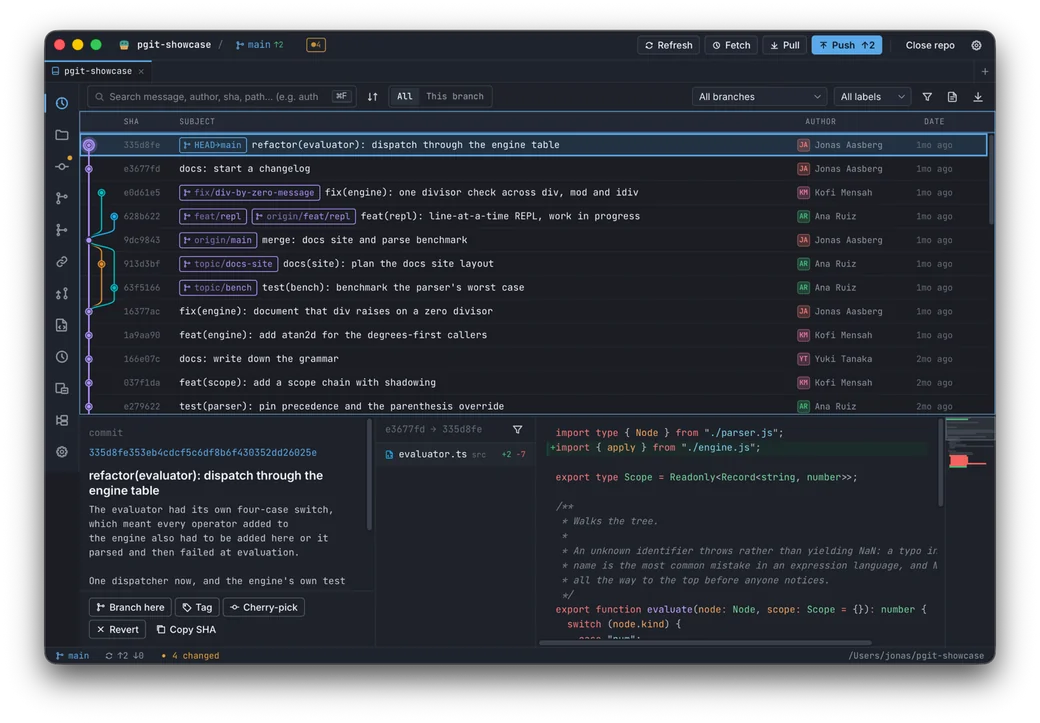
The whole repo, at a glance.
The history view, captured from the app: the commit graph and its refs above, the selected commit’s message, files and diff below.
platypusgit is under active development — expect frequent releases and rough edges. Got a feature idea or hit a bug? Propose it on GitHub Issues ↗
Free for everyone
No license fees, no per-seat pricing, no "pro" tier. Every feature, every platform, zero cost — for solo devs, teams, and companies alike.
Open source
GPLv3. Read the code, file issues, send patches. No telemetry, no account, no lock-in. Your repos and history never leave your machine.
Dev-first
A TortoiseGit alternative designed around how developers actually work — keyboard-driven, dense, no hand-holding. Hunks, rebases, conflicts — all first-class.
Cross-platform & native
Small native binary with real windows on macOS, Windows, and Linux — not a bundled browser.
How it compares.
| Client | Price | Account | Telemetry | Platforms | Licence |
|---|---|---|---|---|---|
| platypusgit | Free | None | None | macOS · Windows · Linux | GPL-3.0 |
| GitKraken Desktop | Free for local and public repos — a paid seat for private ones | Account for private repos | Usage analytics plus the folder and file names where you keep your code | macOS · Windows · Linux | Proprietary |
| Fork | $59.99 once, up to 3 machines | None | None — crash reports only | macOS · Windows | Proprietary |
| Sourcetree | Free | Atlassian account required | Anonymous usage data, opt-out | macOS · Windows | Proprietary |
| TortoiseGit | Free | None | Crash dumps, unless disabled at install | Windows only | GPL-2.0 |
GitKraken ships as an Electron app. Fork, Sourcetree and TortoiseGit are native. platypusgit is a Tauri binary that uses the OS webview rather than bundling a browser of its own.
Checked against each vendor's own pages on 25 August 2026. Prices and privacy policies change, so every claim links to the page it came from — see the sources.
Everything you do with git. In one window.
Staging & commit
Stage/unstage/discard files and individual hunks. Commit with amend + author override.
Diff & viewing
Continuous whole-file diffs with a scrubable minimap, commit-to-commit diffs, branch compare, blame, repo browser.
Branches & tags
List/create/checkout/rename/delete branches. Lightweight, annotated and signed tags.
History
Commit graph, file history, reflog viewer, detached-HEAD checkout.
History manipulation
Reset (soft/mixed/hard), cherry-pick, revert.
Stash
Save/apply/pop/drop, partial stash by path, rename, stash-to-branch.
Conflict resolution
3-way sides, accept ours/theirs, external mergetool, continue/abort.
Interactive rebase
Pick/reword/edit/squash/fixup/drop, continue/abort, base picker.
Remotes & network
Add/remove/rename/prune remotes, fetch/pull/push (with-lease/force), merge.
Pull requests
GitHub + GitLab: list, check CI, open, check out, and create — without leaving the app.
Multi-repo tabs & windows
Several repositories open at once — in tabs, or in separate windows side by side, each with its own screen and badges.
Submodules, LFS & bisect
Submodule + linked-worktree screens, git-LFS objects, and bisect in the operation bar.