
Features
Everything implemented end-to-end today. platypusgit is in active development — the list grows.
How it compares
The four clients developers arrive from, on the things you can check yourself: what it costs, what it wants from you, and what it sends home.
| Client | Price | Account | Telemetry | Platforms | Licence |
|---|---|---|---|---|---|
| platypusgit | Free | None | None | macOS · Windows · Linux | GPL-3.0 |
| GitKraken Desktop | Free for local and public repos — a paid seat for private ones | Account for private repos | Usage analytics plus the folder and file names where you keep your code | macOS · Windows · Linux | Proprietary |
| Fork | $59.99 once, up to 3 machines | None | None — crash reports only | macOS · Windows | Proprietary |
| Sourcetree | Free | Atlassian account required | Anonymous usage data, opt-out | macOS · Windows | Proprietary |
| TortoiseGit | Free | None | Crash dumps, unless disabled at install | Windows only | GPL-2.0 |
GitKraken ships as an Electron app. Fork, Sourcetree and TortoiseGit are native. platypusgit is a Tauri binary that uses the OS webview rather than bundling a browser of its own.
Checked against each vendor's own pages on 25 August 2026. Prices and privacy policies change, so every claim links to the page it came from — any cell here can be re-checked in a minute.
Sources, claim by claim
- GitKraken Desktoppricingfree with local and public reposprivate repos inaccessible on the free planthe GitKraken accountinstall — "open the app and start working"privacy policybuilt on Electron
- Forkpricelicence — three machinesno telemetry (2023)no telemetry, so no privacy policy (2024)Linux still unsupported
- Sourcetreefree, Windows and Mac"You need an Atlassian account to use Sourcetree"Atlassian's privacy policyusage statistics in setup
- TortoiseGitdeveloped under the GPLGPLv2 in the source treeWindows 10 1607+, needs command-line gitcrash dumps to drdump.com
- platypusgitGPL-3.0no analytics dependency and no SDK in the tree, nothing to sign in to, and the only outbound traffic is your git remotes, the update check and forge APIs you configured — kept honest by a guard test
Staging
Granular control over what goes into a commit.
- ✓Stage / unstage / discard whole files
- ✓Stage / unstage / discard individual hunks
- ✓Stage / unstage / discard individual lines
- ✓Stage the focused diff line from the keyboard with Space
- ✓Drag files between Changes and Staged
- ✓Commit with amend and author override
Diff & viewing
See exactly what changed, anywhere.
- ✓Worktree / index / HEAD diffs
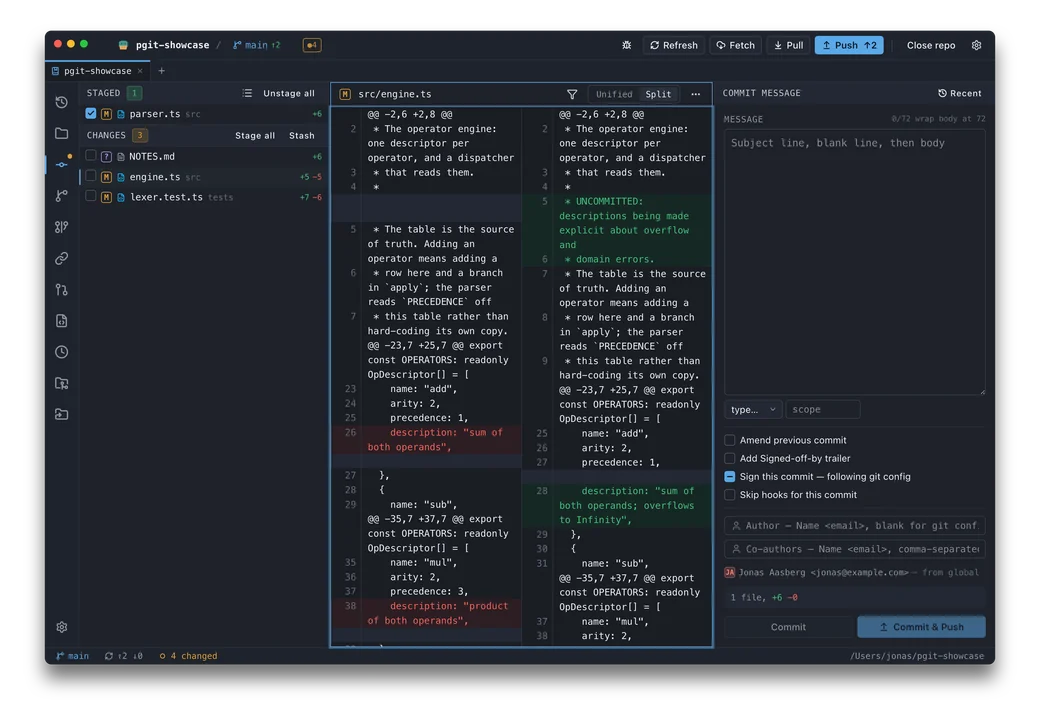
- ✓Whole-file diffs by default — a continuous file with no `@@` banners, changed lines coloured, and Stage / Discard in the gutter beside each change block
- ✓Scrubable minimap beside the diff — the shape and spread of a change at a glance, click or drag to jump
- ✓Unified and side-by-side (split) diff views, with a persisted default
- ✓Long lines scroll the pane rather than wrapping over the row below, or wrap on demand with the Diff screen's Wrap toggle
- ✓Syntax highlighting on every diff, blame and preview surface — tokenized off the main thread
- ✓Word-level highlighting within a changed line
- ✓Configurable diff context lines, with a fold separator that names what it hides and expands it in place
- ✓Commit-to-commit diffs — one commit, or the combined diff across a selected range
- ✓Branch compare — any two refs, or a ref against the working tree, with ahead/behind, both commit lists and the combined diff
- ✓Line-by-line blame
- ✓Repo file browser at HEAD, or any revision
- ✓git-LFS pointers are shown as the objects they are, not as two lines of text
Branches & tags
Full ref management.
- ✓List / create / checkout / rename / delete branches
- ✓Default branch pinned to the top of every branch list, the rest ordered by most recent commit
- ✓Merge or rebase onto any branch — local or remote — straight from the branch picker, the titlebar chip or the Branches screen
- ✓Lightweight and annotated tags
- ✓GPG/SSH signed tags — defaults from `tag.gpgsign`, overridable per tag, with a verification badge on the tag you select
- ✓Push and delete tags
History
Navigate the past.
- ✓Commit graph layout
- ✓Ref-scoped log — browse the log of any branch, tag, or revspec
- ✓Commit / log search (message, author, SHA, date, path)
- ✓Per-file history
- ✓Reflog viewer
- ✓Detached-HEAD checkout
- ✓Customizable HEAD indicator — six independent marks at three weights
History manipulation
Rewrite with care.
- ✓Reset — soft / mixed / hard
- ✓Cherry-pick
- ✓Revert
- ✓Bisect — good / bad / skip from the operation bar, with git's own progress estimate
- ✓Drag a ref or commit onto another to merge, rebase or cherry-pick
Stash
Park work in progress.
- ✓Save / apply / pop / drop
- ✓Partial stash — stash only the paths you selected, one file or a multi-selection
- ✓Rename a stash entry
- ✓Compare a stash — what it changed, or against the working tree
- ✓Stash to new branch
Conflict resolution
Resolve merges without leaving the app.
- ✓3-way conflict sides
- ✓Dedicated merge resolver window — ours · editable result · theirs
- ✓Operation bar — the app announces a merge, rebase or cherry-pick in progress
- ✓Accept ours / theirs
- ✓External mergetool launch
- ✓Continue / abort operation
Interactive rebase
Reshape history visually.
- ✓Pick / reword / edit / squash / fixup / drop
- ✓Merge commits — flatten (git default) or preserve topology
- ✓Continue / abort, resumable after quitting the app
- ✓Reorder steps by drag, or with Mod+Shift+↑/↓
- ✓Rebase base picker
Remotes & network
Sync with anywhere.
- ✓Add / remove / rename / prune remotes
- ✓Fetch / fetch-all / pull
- ✓Push with-lease and force
- ✓Authenticated remotes — every network op prompts and retries, tag pushes and branch deletes included
- ✓Merge branches
Pull requests
GitHub and GitLab, including self-hosted.
- ✓List open pull / merge requests — author, source → target, draft and fork markers
- ✓CI / checks summary for the selected request
- ✓Check out a request locally, forks included
- ✓Create a request from the current branch, as a draft if you want
- ✓Open in the browser in one click
- ✓Per-host API token, stored by your own git credential helper under its own key
Submodules, LFS & worktrees
The parts of a repository that are also repositories.
- ✓Submodule screen — init, update (recursive), sync URLs, open one as its own repository
- ✓Submodules are distinguished from embedded repositories in the file tree
- ✓git-LFS panel — fetch objects, pull objects, checkout, with pointer-aware diffs
- ✓Linked worktrees — list, add on a new or existing branch, lock / unlock, remove, prune
- ✓Removing a worktree with uncommitted work asks a second time before forcing
Navigation & keyboard
Keyboard-first, fast everywhere.
- ✓Multi-repo tabs — several repositories open at once, with ⌘E, ⌥1–⌥9 and Ctrl+Tab
- ✓Several windows — open a repository in a new window (Mod+Shift+D) or move a tab out, each window with its own tab strip and session, restored on relaunch
- ✓Command palette (⌘P) — branches, files, commits, and actions
- ✓Rider-style default keymap, with a Classic preset
- ✓Type-to-jump speed-search in lists
- ✓Commit chords, F7 / ⇧F7 hunk navigation, and stage / discard of the hunk you are on from the keyboard
- ✓Spatial Alt+Arrow pane focus and a ? cheat sheet
- ✓Resizable panels — drag any panel to whatever the window allows, double-click a handle to reset it
- ✓`pgit` command-line launcher — open a repo from the terminal and get the prompt straight back, installed by the `.deb` and `.msi` packages or from Settings
Planned
On the roadmap, not yet shipped.
- soonHunk-level stash — stash part of a file, not only whole paths
- soonSigned & notarized macOS / Windows builds